 The Buddy System
 SwipeBuddy
Daily limits for short videos that actually block
Set a daily budget for TikTok, Reels and Shorts. When it runs out, they're blocked until midnight. Not a notification you swipe away, an actual wall. Keep the limit steady, or let SwipeBuddy bring it down a little every week.
Free on the App Store, with an optional Pro plan · iPhone and iPad
What you get
- Real blocking through Apple's Screen Time, not a reminder
- A daily limit that can step down every week toward a goal
- One limit shared by your iPhone and iPad
- A 30-second pause and a reason before any emergency unlock
- Stricter settings apply now, looser ones only tomorrow
- Shorts and Reels removed in Safari, the rest of the site intact
- Insights on when you scroll, and a year in review you can share
What it costs
Blocking, a steady limit, year in review
Step-down limit, caps, Safari, insights
or $29.99/yr, or $79.99 once
SwipeBuddy is the one Buddy with a subscription. The Safari extension needs steady upkeep as YouTube and Instagram change their sites, and the yearly plan starts with a free week. There's no web version: Screen Time only works on the iPhone or iPad itself.
A look inside


The bits worth explaining
Blocked means blocked
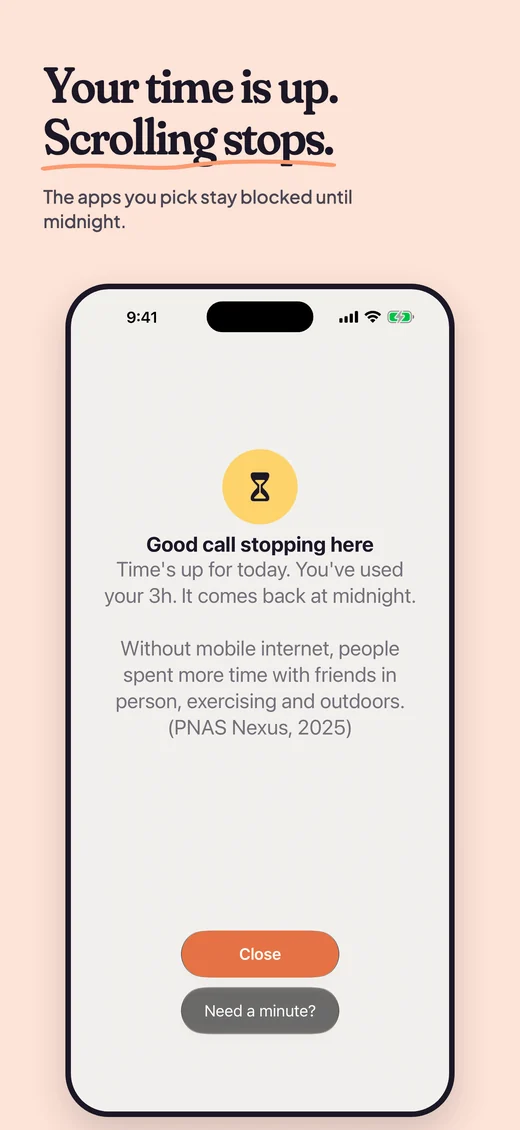
SwipeBuddy uses Apple's Screen Time, the same system behind the iPhone's own app limits. When your time is up, the app is covered by a block screen you can't scroll past, with a friendly nudge and a fact from the research on why it's worth it.
A limit that comes down slowly
Pick where you are, where you want to be and by when. SwipeBuddy splits the gap into equal weekly steps, and warns you if a step is too big to stick with.
Stricter now, looser tomorrow
Lowering your limit applies right away. Raising it, removing an app or adding unlocks waits until midnight, so a moment of temptation can't quietly undo a decision you made with a clear head.
One limit for iPhone and iPad
An hour a day means an hour across both. Your devices share the limit and your emergency unlocks through your own iCloud, so switching to the iPad doesn't double your time. They catch up every few minutes of use, so the total can run a little over. You pick your apps on each device, since iOS keeps those separate.
Nothing comes to me
Apple never even tells SwipeBuddy which apps you picked. Your usage numbers stay inside Apple's own report view, and there's no account, no server and no analytics. With sync on, your settings and daily minutes travel through your own iCloud, which I can't see. The details are in the privacy policy.
Get SwipeBuddy
Download it free on iPhone and iPad. Questions? The support page has answers, or email me.
The rest of the family

TeaBuddy
A gongfu tea journal that thinks in sessions, not cups.

CoffeeBuddy
Log every brew, then let the journal tell you your own taste.

TransformationBuddy
A calm, consistency-first sidekick for a body transformation.

T minus 90
One Work quest, one Life quest, ninety days on the clock.

BookBuddy
A reading journal, an illustrated shelf, and your Year in Books.